
Monitor local services,
beautifully.
ServiceWatch is a sleek, lightweight desktop GUI that automatically discovers, runs, and streams logs from all your local development projects instantly.
Download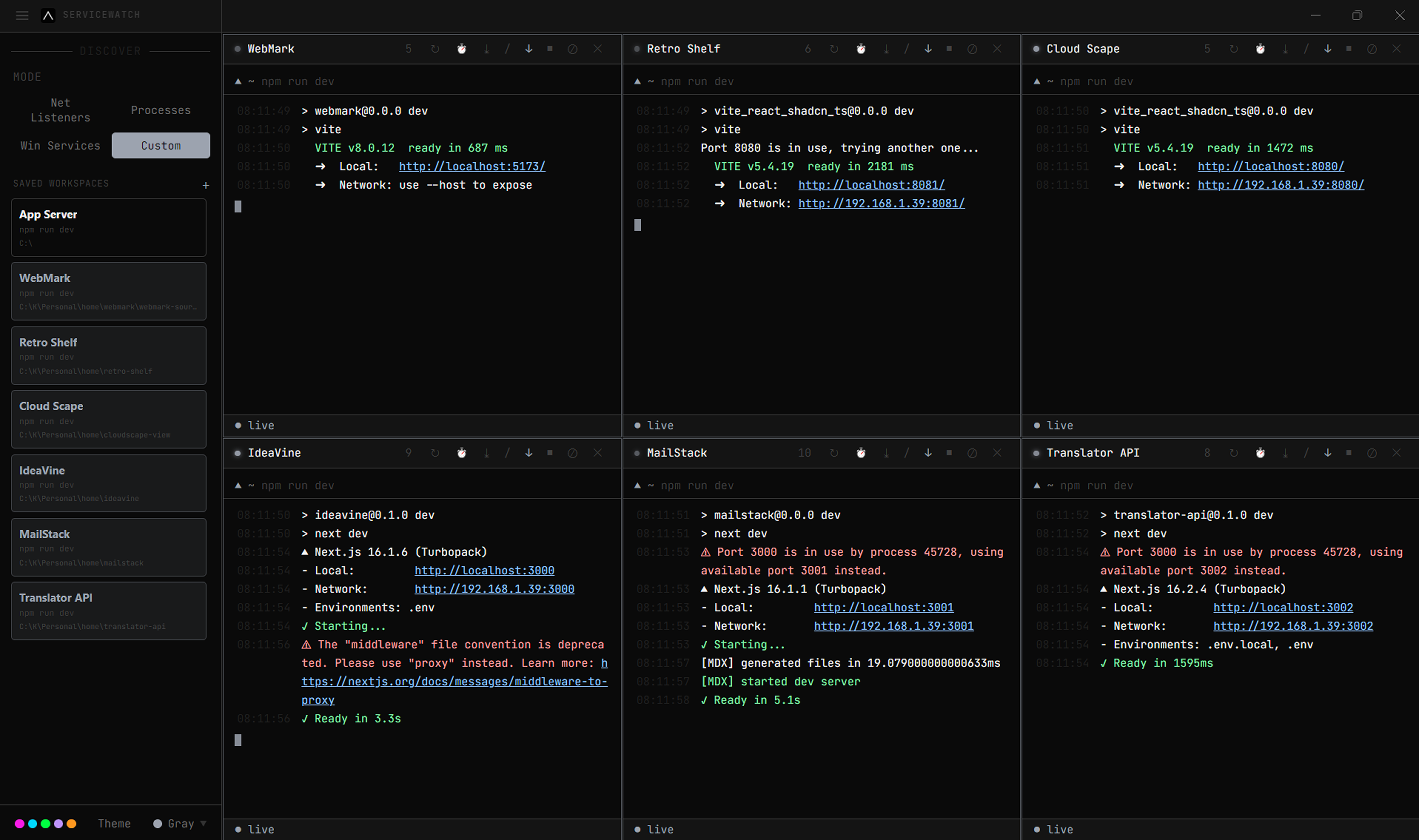
Installation
latest version: v1.0.0
| 64-bit | |
|---|---|
| macOS (.app) | Coming soon |
| Windows (.exe) | v1.0.0 |
Project Goals
The goal of the project is to create a beautiful and extensible experience for command-line interface users, built on open web standards. In the beginning, our focus will be primarily around speed, stability and the development of the correct API for extension authors.
In the future, we anticipate the community will come up with innovative additions to enhance what could be the simplest, most powerful and well-tested interface for productivity.
Configuration
The config object in .servicewatch.js allows you to customize the behavior and appearance of the terminal.
| Property | Default | Description |
|---|---|---|
| theme | "nord" | The default color theme to use across the UI (e.g., "nord", "dracula"). |
| defaultWorkspace | "~/projects" | The default directory ServiceWatch scans for package.json or Makefile files on startup. |
| autoScroll | true | Automatically scroll to the bottom when new logs are streamed. |
| showTimestamps | true | Prepend all parsed stdout/stderr logs with the local time. |
| maxLogLines | 5000 | Maximum number of log lines to retain in memory per running service. |
| startInZenMode | false | Automatically launch the application in Zen Mode with the sidebar hidden. |
| fontFamily | "Fira Code, monospace" | The font family used for rendering the terminal logs. Supports ligatures. |
| fontSize | 13 | The default font size in pixels for the terminal output. |
| shell | "powershell.exe" | The default shell path to execute background custom commands. |
| hardwareAcceleration | true | Utilizes WebGL for rendering the terminal to achieve 60fps scrolling. |
Keyboard Shortcuts
ServiceWatch provides global hotkeys for navigating panels and managing workspaces effortlessly.
| Command | WindowsWindows / Linux |
|---|---|
| Open Command Palette | Ctrl + P |
| Toggle Zen Mode | F11 |
| Clear Log Buffer | Ctrl + K |
| Save Log Export | Ctrl + S |
| Switch Workspace | Alt + 1-9 |
| Toggle Sidebar | Ctrl + B |
| Global Search | Ctrl + F |
| Quit ServiceWatch | Ctrl + Q |